Adding navigator filters to Eclipse 2.x
By ericblue Categories: Software Development Tips | 4 comments

For the last year or so, I’ve been using
Eclipse as my IDE. One
limitation that I’ve noticed with Eclipse 2.1 is the inability to customize file extention filters.
These filters are important because every time you checkout files from the CVS repository a new CVS
subdirectory is created. And, each time you recompile, there will be dozens of *.o object files.
Since you can’t customize the filters anywhere in the UI, you’ll have to define the filters
manually. To do this, you’ll need to do the following:
1. cd to %eclipse_root%\plugins\org.eclipse.ui_2.x.x
2. Edit the file plugin.xml
3. Search for “<filter” and you should find the filter definition for the pattern “.*”
4. After this definition, add your own filters. For example:<filter selected="false" pattern="CVS*"> </filter> <filter selected="false" pattern="*.o"> </filter>5. Restart Eclipse, then open the Navigator view. If it’s not already open, go to Window -> Show View -> Navigator. Click on the Down Arrow/Menu, then Filters. You should see:
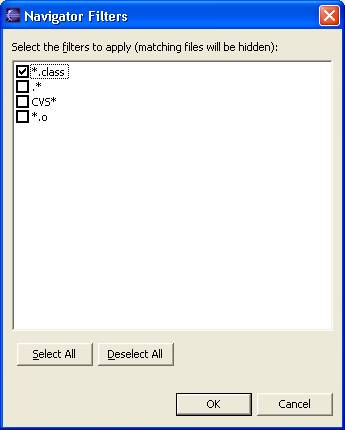
Select your new filters and you’re ready to go!
Update 06/06/06:
Eclipse is by far the best IDE I’ve used so far, however “out of the box” it is a Java-only IDE.
Since I also develop in C and Perl, I use the
SlickEdit plugin for
Eclipse. Although the SlickEdit editor plugin is rich in features, you can’t modify the default
filter list while in the Navigator view (the default filters are *.class and .*).
— I was incorrect in originally posting that the navigator view was handled by SlickEdit. This has
nothing to do with SlickEdit. This, in fact, has been a known issue with Eclipse 2.1 since 2001. See
https://bugs.eclipse.org/bugs/show_bug.cgi?id=1970
for the original bug. My sincere apologies to SlickEdit if my post indicated that this was a lack of
functionality in their product!
4 Responses
-
 Scott Westfall
Hi Eric,
I’m the Director of Development at SlickEdit, and I’m glad the SlickEdit Plug-in has been a boost for you. In your posting, it sounds like you are saying that the problem with the Navigator is related to our plug-in. The Navigator view is a stock part of the Eclipse environment. We work hard to make sure that our plug-in does not interfere with any of the stock parts of Eclipse.
It does seem odd that there isn’t a simpler way to add filters, and this is a really useful tip. -
Eric Blue
Hi Scott,
Thanks for bringing this to my attention. I’ve made sure to update the post to reflect my mistake. I definitely owe you guys a good review of SlickEdit when I get a chance! 😉
BTW, I recall chatting with you a couple years ago when I had some questions about my SlickEdit install. You were really helpful, so kudos to you guys for your great customer service. -
Christoph
Hi Eric,
I’m currently programming a RCP application. For some reason this filtering doesn’t work in my Eclipse RCP application. Do you know if there is a change in the filtering mechanism with Eclipse 3.3. It seems that there are a lot of things are implemented and some work, some don’t. Maybe the information in this blog is old? -
Christoph
Hmm, it seems that I fixed it by adding the following line to my plugin.xml:
<contentExtension pattern=”org.eclipse.ui.navigator.resources.linkHelper”/>
Comments are closed.